
CISF Employee Corner Login, Payslip At www.cisf.gov.in
Visit CISF Employee Corner to download CISF payslip & monthly basic salary, pay slip, GPF, grade pay online details. Log in to www.cisf.gov.in to view your account statement. The Central Industrial Security Force (CISF) is one of the Central Armed Forces which runs directly under the Ministry of Home Affairs, the Government of India and its headquarters are located in New Delhi.
To ensure the protection and safety of sensitive governmental buildings and other industrial sectors, Delhi Metro, airports, and the Government of India raised the Central Industrial Security Force on 10th March 1969. Visit the official site www.cisf.gov.in for CISF employee corner login & CISF payslip.
However, CISF personnel are also dispatched in different regions in order to provide security over major industrial sectors of the Government of India, such as atomic power plants, space installations, mines, oil fields and refineries, major ports, etc., controlled by Central Public Sector Undertakings (PSUs).
In this article, we will tell you How To login at Cisf employee corner portal and how to check CISF Monthly salary slip details.
CISF Employee Corner Login Steps
The CISF employee corner login is a process that requires a proper internet connection in order to avoid interruption while you are trying to log in order to check your CISF payslip for a particular month.
Now, then those of you who are currently under the wings of the Central Industrial Security Force (CISF) must already have your personal CISF payslip login details, which will be necessary for the login process.
Before you reach the CISF login page, certain initial steps must be completed. So, below each and every step required for the login process has been mentioned for your assistance.
Through this process, individuals can directly visit the page of the CISF employee corner.
Step 1. Go to https://cisfapp.cisf.gov.in/.
Step 2. Click on the employee corner option.
Step 3. Now, a login page will open.
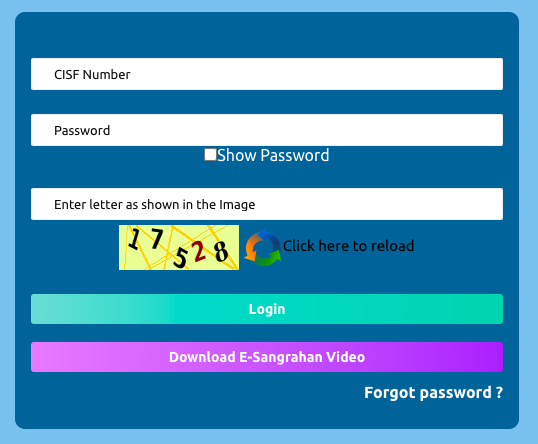
Cisf Employee corner
Step 4. Now enter your CISF number and password.
Step 5. Next, enter the captcha code.
Step 6. At last, click on the Login button.
Step 7. Now your employee dashboard will open, where you can check your payslip and employee-related data.
How to Reset CISF Employee Corner Login Password?
In case a CISF personnel member is unable to remember the CISF login password, then a certain method or a series of steps can help the individual to retrieve the password or create a new password.
However, to reset your CISF salary slip password, it is important that you have an active mobile number or email address in order to receive the password recovery link sent by the website.
So, if you are in possession of an active mobile number or email address, then all you need to do is follow the steps that have been provided below to recover your lost password or create a new one.
- Go to the official website of CISF (www.cisf.gov.in).
- Click on the CISF Employee Corner on the homepage.
- The login page will then appear on your screen.
- Look for the Forgot Password option and click on it.
- Enter the required details, CISF number, and captcha code and then click on Reset.
- A link will be sent to your email address or OTP to your mobile number.
- Click on the link and reset your password.
- Or validate the OTP to reset the CISF payslip password.
How to Check CISF Payslip Online at www.cisf.gov.in
As per the regulations, the Central Industrial Security Force service personnel have the right to check the CISF payslip online, which is basically the receipt of their monthly salary transaction, which also includes their monthly salary, income tax, PF, deductions, GPF, basic pay, grade pay & total pay after 7th pay commission details.
Therefore, downloading the CISF constable, head constable, SI, ASI payslip with the assistance of the CISF employee corner would certainly help the individuals to be aware of every activity involving their monthly salary for any month.
So, CISF service personnel need to be aware of such services which are exclusively provided by their parent organisation (CISF), which maintains the complete CISF pay slip account of every individual.
Since every CISF service personnel would possess their personal account, certain credentials are unique and mandatory to be able to access their CISF payslip account.
- CISF payslip username or ID number.
- CISF login password.
NOTE: Such CISF login credentials are different and unique for each individual, so make sure to be discreet with your details. Follow these steps to view or check your pay slip online.
- The first step is to visit the official website of CISF (www.cisf.gov.in).
- On the homepage, look for the Employee Corner option.
- Now, click on the CISF Employee Corner.
- The CISF Login page will open.
- Enter your CISF username, login ID, or Force number.
- Then enter your password.
- Also, enter the captcha code.
- At last, click on the Login option.
- Your monthly CISF payslip should be displayed.
Note: Other than the above-mentioned process, there is another method through which individuals can log in and complete the CISF payslip, which can be downloaded.
CISF Salary Allowances
- Dearness Allowance
- Ration Money
- Transport Allowance
- Special Duty Allowance
- Hostel Subsidy
- Dress allowance
- Risk/ Hardship allowance
- Detachment allowance
- House Rent allowance
- Children’s Education Allowance
- Non-practising allowance to medical officers
FAQ’s
- How do I download the CISF payslip? To download your CISF payslip online, you need to visit the official website, i.e., www.cisf.gov.in. Then click on the employee corner. After this, enter your username and password. In the last click on the login button and download your month-wise salary slip.
- What is the salary of CISF? CISF employees or personnel get salaries according to their rank. CISF constable gets a basic salary of 5200- 20200 with 2400 rupees grade pay. Whereas the SI gets 9300-34800 basic pay with 4200 rupees grade pay.
- What is the salary of a Sub Inspector in CISF? CISF SI Sub Inspector gets 9300-34800 basic pay with 4200 rupees grade pay.
- What is the salary of a CISF Constable? CISF Constable gets a salary between RS 5200 and Rs 20200. The pay matrix for CISF Constable is 20,500 to Rs 70,100, including a grade pay of 2400 rupees.
About CISF
The CISF or Central Industrial Security Force is an integral component of the Central Armed Forces of India. Like every other armed force, the CISF is governed by the Ministry of Home Affairs, the Government of India.
Before it became an armed force of the Republic of India under the Act of Parliament passed on 15th June 1983, it was first set up on 10th March 1969 with a strength of 2,800 personnel. Currently, the force has a strength of more than 180,000 personnel.
Primarily, the CISF provides security to various government industrial units, infrastructure projects, facilities, etc. The CISF is responsible for the security of every major government property that includes space installations, atomic power plants, mines, and more.
Final Words
The contents of this article are strictly based on the official instructions available at the official website of the Central Industrial Security Force; however, for queries related to the CISF payslip, make sure to leave it in the comments below.