
IFMS MP Treasury: Employee Login, Pay Slips & Challans
Login on the IFMS MP Treasury website, i.e. mptreasury.gov.in, and check your Madhya Pradesh Cyber Treasury Employee Salary Slip Report and IFMIS Login details online. Furthermore, by the end of this article, you will know how to complete your MP Treasury Challan download. Hence, concerned readers should check out this article.
We will ensure that you can get every single piece of information related to the MP Treasury. So readers should also carefully read the various sections of this article.
Since there are different sections in this article, we would like to point out the topics covered in the following sections. In the following section, check the MP Treasury payslip download, IFMS MP Payslip login, and reset password steps.
You can also get information about Madhya Pradesh Treasury DDO request, MP Challan search, and MP Treasury PPO. At the end of this article, you should also check out the MP Treasury FAQ.
IFMS MP Treasury Pay Slip Login Online
You can check your MP Treasury employee’s personal details from the portal of MP IFMS. The IFMS or Information of Financial Management System also provides you with the necessary service that is subject to the employee’s payslip.
To check your payslip through MP Treasury IFMS, you must first go through the IFMS Personal login. The completion of IFMS MP Login is mandatory. So you are going to need your user ID and your login password.
Like the official MP Treasury portal, the IFSM also maintains a personal account for employees. So, in order to provide the correct details, the portal requires certain details for the identification of the user.
Hence, it is important to provide the correct login details. So you cannot access details of individuals other than your own.
Even though you need to know the whole login process. So, for those who are unaware of the process or rather steps the following instructions can be useful
- First, visit the website www.mptreasury.gov.in.
- On the homepage, click on the Employee Login option.
- The login page appears. Here you need to enter your USER ID and Password.
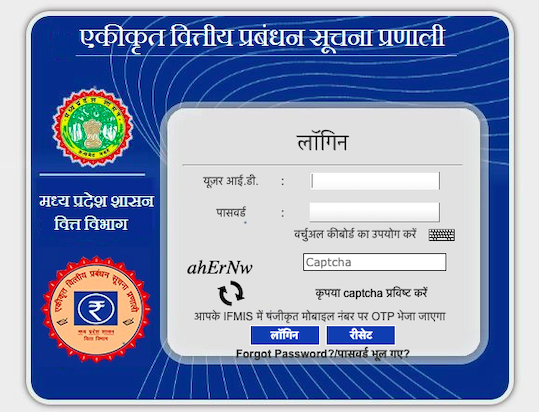
IFMS MP Treasury
- Then click on the Submit or Login option.
- After you click on the login or submit option you IFMS MP Treasury payslip details will be displayed.
Login At Official IFMS Website
IFMS MP Treasury Login Password Reset
To reset or create a new IFMS login password, you must visit the IFMS MP Treasury portal. Due to the fact that you can create a new password only through the IFMS portal. But, since you can create a new password online all you need is a few minutes. Unless you are unaware of the steps that are involved.
Your MP Treasury IFMS Login password is as important as your username or ID. So try not to forget your password. However, in case you do forget it, just know that you can always reset your password.
Even though you remember your password, you should at least be aware of the process. Because you may need it when you are unable to log in due to an incorrect password.
So, without wasting much of your time, below you can check the complete process of MP Treasury IFMS to reset the password. By following these steps, you can create a new password.
- Visit the website of MP IFMS viz.www.mptreasury.gov.in.
- On the homepage, select your preferred language ( Hindi or English).
- Now enter your IFMS user ID number. Then click on the Submit option.
- You may need to provide an active email address or your mobile number.
- Once you receive the OPT. You need to validate it in the required field.
- Then follow the instructions to finally create the new password.
MP Cyber Treasury
The MP Cyber Treasury developed by the MP Treasury offers excellent services. Individuals can make their payment of State Taxes/Fees through the “Cyber Treasury”. In fact, you don’t need to visit your respective MP Treauwyr office.
Hence, the MP Cyber Treasury was developed for the purpose of making e-payments. As a result of the development, you can make online payments anytime, anywhere with the help of the internet.
Once you have made the payment, make sure to receive the acknowledgement receipt bearing the Challan Identification Number. So in order to verify your payment success through the Cyber Treasury, you need your Challan identification number.
Although the MP Cyber Treasury is available for all departments. Below we have listed some of the departments for which you can make an online payment. So next time you can make your payment from your home.
Since the MP cyber Treasury services are available 24 hours. You should make sure to pay your outstanding government fees. In order to confirm your payment, you can verify your Challan Identification Number at www.mptreasury.gov.in.
MP Treasury DDO Requests and Codes
A Drawing and Disbursing Officer (DDO) is responsible for presenting bills to the treasury. For an employee’s bill to be passed, it must be submitted via an active DDO.
-
DDO Request: Bills must follow the prescribed official format before being presented.
-
DDO Codes: Every division has a specific DDO Code. You can download the DDO Code List PDF from the “Reports” section of the website to identify your specific office code, which is necessary for checking expenditure and allotment reports.
MP Treasury Challan Search By CIN/CRN
The MP Treasury Challan is important for those who have paid their dues through the cyber treasury. In order to confirm or verify your payment, you need to check out the challan status.
In order to verify your payment, you have to visit the official website of the MP Treasury office. There, you can search for your challan status with the help of your challan number.
Along with making e-payment of your pending challan for any department, you can track your MP Treasury challan status online. To track your challan status, you need your challan number.
So once you have paid your MP Treasury Challan, you can check the status online. You can use the challan number to search for your challan. In order to search your challan status, follow these steps.
- Go to www.mptreasury.gov.in.
- Now, on the left side, look for the Cyber Treasury and click on the Challan Search option.
- Now select your preferred option (CIN or CRN).
- If you click on Challan Search By CIN, then enter your CIN number and click on submit.
- If you choose Challan Search By CRN number, then enter your CRN number and click on submit.
- Now you should be able to see your MP Treasury Challan Status.
Challan Search: Click Here
MP Treasury Pension
Along with the payslip details of current employees, the MP Treasury also maintains the MP Treasury Pension accounts and details. So every pensioner can check their MP PPO Status or MP Treasury Pension slip details online.
Thus, the record of every MP pensioner can be obtained from the website of the MP Treasury. However, as a pensioner, you must be able to ensure your identity. So to gain access to your MP PPO details certain details are mandatory.
Through the MP Treasury website, you can get details of the first pension payment report, report on pension grievances. Along with these reports, you can also check other reports as per your concerns.
Below is the entire list of MP Treasury Pension slip reports that you can have access to. So when required you can simply visit the portal and acquire information as per your queries.
In order to check any of the above-mentioned reports, you have to follow the official instructions. Here we have written the complete steps to help you get the necessary MP Treasury Pension details.
- Initially, visit the website of the MP Treasury (www.mptreasury.org.in)
- On the homepage, place your cursor on the Pension Report option.
- Now, click on the desired report.
- Next, enter the required details.
- Then click on the Submit option.
- Finally, you should have the details on your screen.
Pension Search: Click Here
FAQ’s
Q. How to check MP Treasury DDO Wise Employee Details?
Ans. Since you already know that you can check MP Treasury DDO-wise employee details online. But you must visit the official website of the MP Treasury.
To make things easier for our readers, we have mentioned the steps along with the link to the MP Treasury. So, click on the link and follow the instructions given below to check MP Treasury DDO Wise Employee details.
- Go to this website www.mptreasury.org.
- Now several options appear. Place your cursor on Employee Reports.
- Then click on the DDO Wise employee details.
- Now enter your respective DDO Code.
- Your details appear on the next page.
Q. How to Check DDO Wise Expenditure & Balance Allotment Report?
Ans. The answer to this question is similar to the previous question. You can check it online. But you need to select the proper option. So if you are unaware of the steps, then you can follow the steps written below.
- Visit this link www.mptreasury.org.
- On the homepage, place your cursor on the Expenditure reports.
- Then you need to click on DDO Wise Expenditure & Balance Allotment Report.
- Now on the next page, select your Financial year and your DDO Code.
- Then click on the Submit option.
- At last, you can check your MP Treasury DDO-wise Expenditure & Balance Allotment Report.
Q. Can a PPO Be Transferred from one state to another?
Ans. Well, our answer to this question is yes you a PPO can be transferred from one state to another. However, in order to complete the transfer, you must fulfil certain requisites.
Now, if you want to transfer your MP PPO to another state, then you must first make a formal request. In other words, you have to submit a written request to your respective Treasury office.
Once you have submitted your request, your request will be sent for transfer. The MP Treasury informs the pension office and the bank. Finally, a transfer request along with your details will be sent to your desire State’s treasury office.
Q. What is the importance of the MP Treasury Pay Slip?
Ans. The important aspect of the payslip is that it approves of your employment with the government. So every government or non-government organisation offers a monthly payslip to its employees.
Other than confirming the employment of an individual, the payslip contains sensitive information. Hence, in order to get the payslip, an individual must provide certain details.
The MP Treasury employee’s payslip contains details related to the payment that occurs every month. So, along with your salary payment details, you can check the deductions of loan, GPF and tax projections